Smart Sources
Text editor that allows you to fetch sources in-flow as you write.
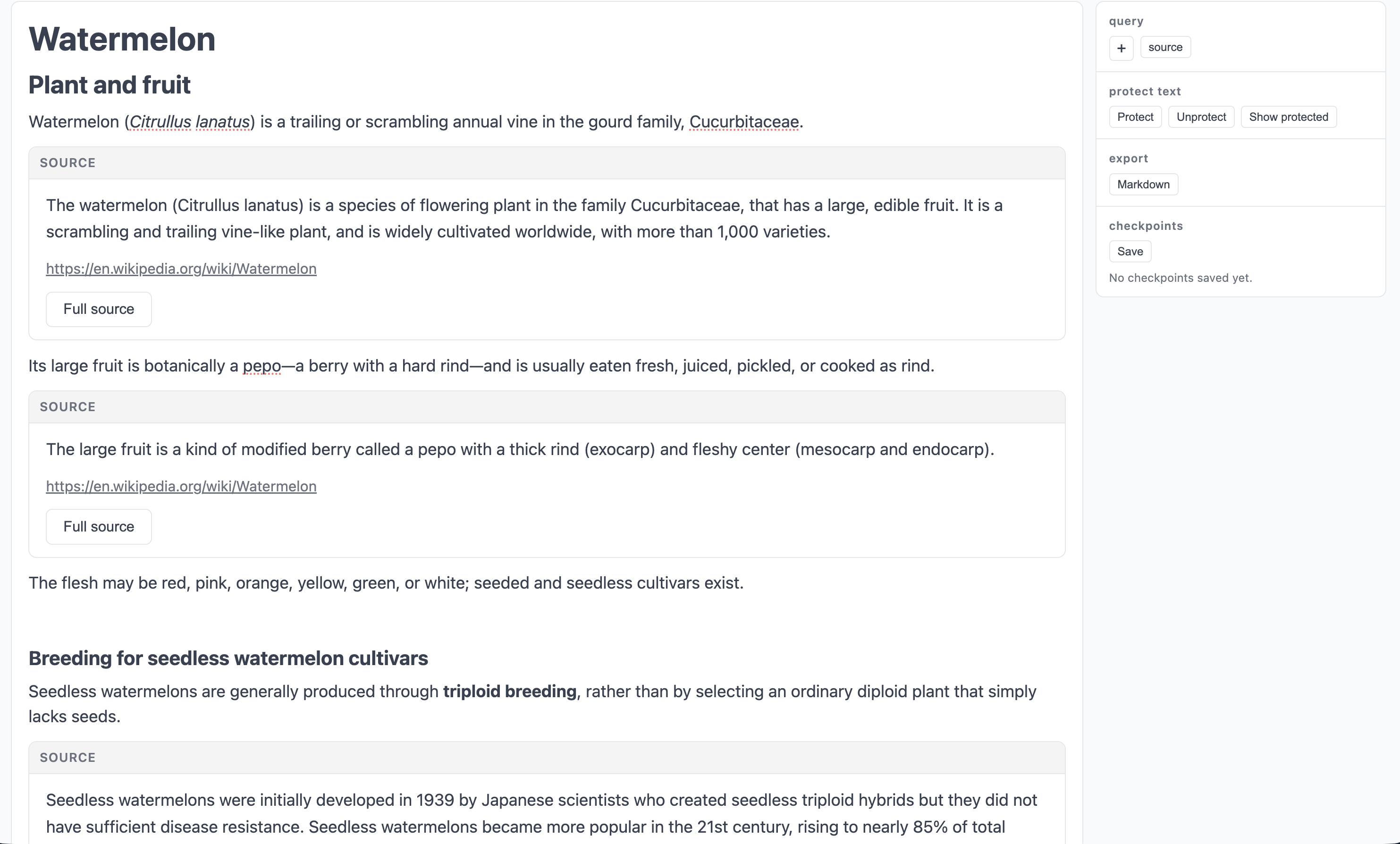
Goals
The product goal for this project is smooth a researching experience, with ground-truth text of relevant sources available at your fingertips as you write, explore, and summarize for yourself. We use wikipedia as an example document corpus, with plans to extend to personal reference libraries in the future.
The technology goal of this project is to address a couple of pain points in chat style interface to language models (LMs).
-
There is always a layer of interpretation required for sources presented by the model: they are summarized, rather than ground truth, and exploring these sources requires finding and opening them in new tabs, interrupting flow.
-
The context gets filled with branching explorations, which are often not relevant later. This includes the initial query, which models tend to focus on.
This project addresses these by
-
Embedding sources directly into outputs, so that they can be expanded, explored, and refocused.
-
Presenting the context as an editable markdown document (plus the sources that it references), so that portions can be added, subtracted, and rearranged as needed.
I also add a third pillar of interaction
- Human written text is never overwritten or modified by the language model. This gives confidence that your own writing will not be modified or nudged by the language model outputs.
Technology
Fairly standard tech stack: Typescript, React for the frontend, FastAPI for the backend, with Pydantic AI for agent management.
Key choices:
-
The frontend uses the Tiptap headless editor as a baseline for the text editor. This allows what-you-see-is-what-you-get typing of markdown formatted text, and allows UI elements (here sources) to be added as nodes in the document tree, so they can be deleted, copied, and pasted.
- I don’t use a vector database for the whole wikipedia dataset, due to the cost of storage of such a large vector dataset. This can be be traded-off with query speed using an approach like LEANN, but the speed costs are substantial, and the text data must still be stored locally. I settled on a simpler solution:
- LM context-based query enrichment
- queries to wikipedia’s search API
- LM synthesis
- I do use a vector database to associate statements in the generated text with statements in the references. Hosted locally, these embeddings can be computed on device. For the hosted version, we use an embedding endpoint.
Design choices
There are a couple of implicit contracts for anyone who uses the application.
First, and most important, the contents shown by any source panel must be a faithful extract from the source itself, so that these can be read as ground truth. Here, we use a single generative pass to generate both summary text and extracts from the references that support key points in the summary. We then verify all extracts against the ground-truth text of their reference. If no exact match is found (which happens surprisingly often) we use semantic embeddings to find the ground-truth chunk that best matches the extract provided, and use that ground truth chunk as the source text. This contract is communicated to the user by highlighting: expanding sources highlights the extract in the source text itself. The highlighting should, therefore, be robust to build trust in the fidelity of all extracts.
The second contract is that all claims made in the write-up should be sourced from the ground-truth text. We do not do this here, but this could be achieved by matching claims in the summary and extracted references, and only showing claims that are supported by (i.e. match well to) ground-truth extracts. I find this approach to be overly restrictive on the generated text, essentially collapsing it down to just the extracts themselves. Instead, given that people are already aware of the potential dubiousness of LM outputs, I chose to implement a weaker version: the `source’ button, which searches the sources for sentences that match highlighted text (generated or written).
Links
Source on github: https://github.com/lrast/smart_sources
Live version (may take a second to load): https://smart-sources.fly.dev/